
OpenAI
Connect an OpenAI API organization to analyze its cost and usage in Ternary.
Connect your OpenAI API organization to analyze its cost and usage alongside other technology spend. This integration covers the OpenAI API platform. It does not import ChatGPT subscription or seat fees.
Before you start
- Your Ternary user needs permission to create data integrations. Ask your tenant administrator if you cannot access Admin → Integrations or create a connection.
- You need access to the OpenAI organization settings and permission to create an organization Admin API key. A project API key cannot be used for this integration.
Each OpenAI organization can be connected once per Ternary tenant. Use a unique integration name and a separate integration for each organization.
Prepare the OpenAI credentials
- In the OpenAI platform's organization settings, copy the organization ID exactly as displayed.
- Open OpenAI Admin keys and create an Admin API key for that organization. Choose Restricted and set Usage API Scope and Organization Administration to Read.
- Copy the key securely. Ternary requires an Admin API key starting with
sk-admin-, rather than a project key starting withsk-proj-.
See OpenAI's Admin API documentation for organization administration and key management.
Create the integration in Ternary
-
Go to Admin → Integrations, select New Integration, then select OpenAI.
-
In General, enter a unique Integration Name.
-
In OpenAI API, enter the following values:
Field Value Organization ID The ID copied from the OpenAI organization settings. Organization Display Name Optional readable name for the organization. Admin API Key The organization Admin API key you created. 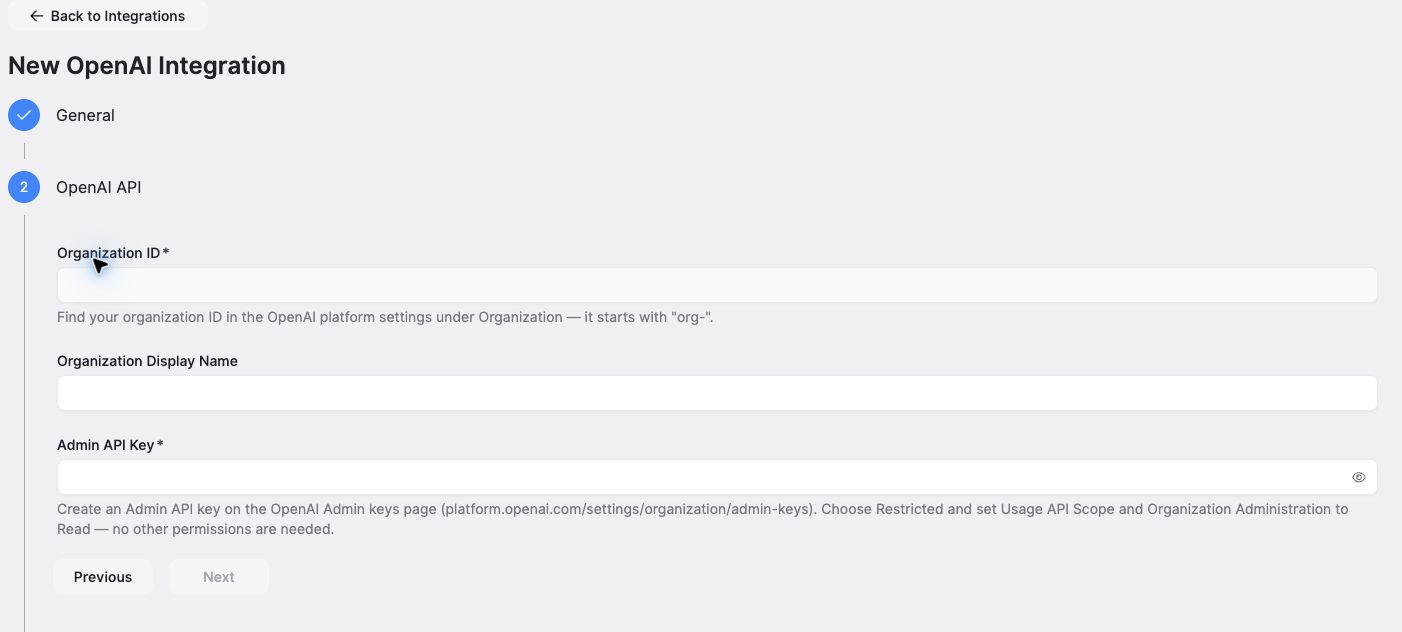
The OpenAI API step requires the organization ID and Admin API key. The display name is optional.
-
Review the configuration and select Submit. Ternary saves the integration and checks the credential.
Verify the connection and data
In Admin → Integrations, check Billing Permissions and Ingestion Status separately. Blocked means a required validation is failing and ingestion is blocked. No usage can indicate that no usage has been collected or that a previously active feed has no recent usage. Check the status tooltip and latest usage date; this status does not establish that the organization has never had usage.
Check the integration's validation result before expecting data. A message that the integration was saved but its credential could not be verified means the configuration exists, but access has not been confirmed. Check the key type, permissions, and organization ID, then correct the saved integration. If the credential check could not run, check again after a scheduled validation or contact Ternary.
After ingestion, open AI Observatory or a report for a period in which the organization has API usage. Confirm that the expected organization and OpenAI data are present. Credential validation confirms access; it does not mean ingestion has completed. If validation succeeds but data remains missing, check the report period and contact Ternary for help.
Costs come from OpenAI's reported Costs data, while model and token detail also comes from its Usage data. Rows marked Cost Source = OpenAI usage only retain usage quantities without a monetary cost; that empty cost is expected. Cost and usage records can identify a model at different levels of detail.
Check a completed usage day when verifying costs. The current day may not yet have publishable cost data. Missing token or cost values do not mean zero usage. Use the AI Observatory interpretation guidance when comparing sources.
Update or rotate credentials
Edit the existing integration to change its name, display name, or Admin API key. Leave the key field blank to retain the current key. Validate a replacement key before revoking the old one in OpenAI.
The organization ID cannot be changed. Create a new integration to track a different organization.
Updated 2 days ago