
Databricks
Learn how to integrate Databricks with Ternary to ingest usage and cost data for unified reporting and analysis.
Ternary’s Databricks integration ingests usage and cost data from Databricks system billing tables into the Reporting Engine. This enables analysis of Databricks consumption alongside other cloud providers for a unified view of platform spend and usage.
The integration reads native Databricks usage tables such as system.billing.usage to capture compute, storage, and resource level consumption.
Data is ingested every four hours, with an option to trigger a manual update from the integration settings.
Requirements and prerequisites
The following requirements must be met before configuring the Databricks integration:
Access and identifiers
A Databricks service principal is required with read-only access to usage tables. Gather the following details from the Databricks admin console:
- Account ID, the GUID for your Databricks account
- Workspace URL or Host for each workspace, for example https://adb-xxxx.azuredatabricks.net
- Warehouse ID used for executing queries
- Service Principal ID (Client ID), the numeric identifier
- Service Principal UUID or Application ID, used for OAuth federation
Permissions
The service principal must have:
- Read access to usage tables such as system.billing.usage and related system tables
- Permission to query the selected warehouse(s)
- An OAuth federation policy configured for authentication
Naming constraints
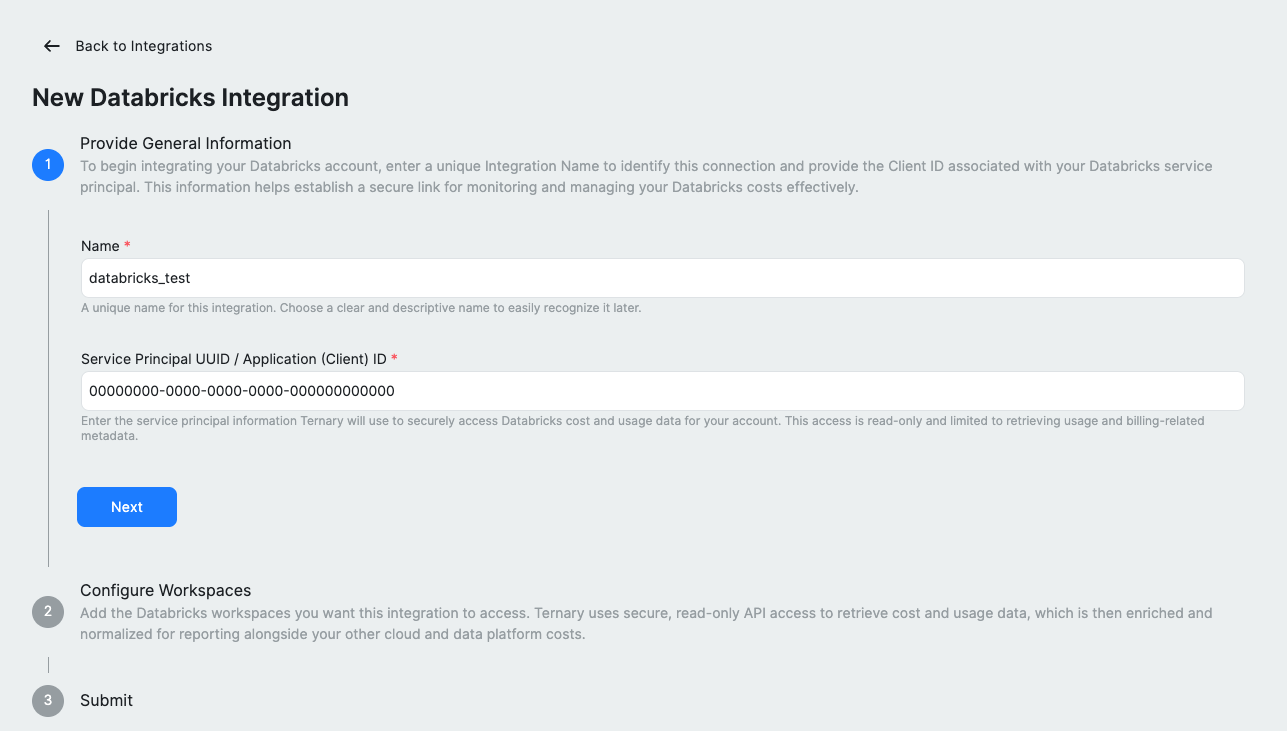
Integration names cannot contain spaces. Use underscores or hyphens, for example databricks_test.
How to configure Databricks integration in Ternary?
Step 1: Create a service principal
Create a dedicated service principal in your Databricks account for Ternary. Note the Client ID and Application ID (UUID), as these will be required during integration setup. For detailed steps on creating a Databricks service principal, check out this Databricks documentation.
Step 2: Grant required permissions
Grant the service principal read access to Databricks usage tables and ensure it can query the selected warehouse. Configure an OAuth federation policy to allow the service principal to authenticate.
Step 3: Add the integration in Ternary
Sign in to Ternary with Admin privileges and navigate to Admin → Integrations. Click New Integration and select Databricks. Enter a name for the integration without spaces and provide the Service Principal UUID or Application (Client) ID, then proceed to the next step.
Step 4: Configure workspaces
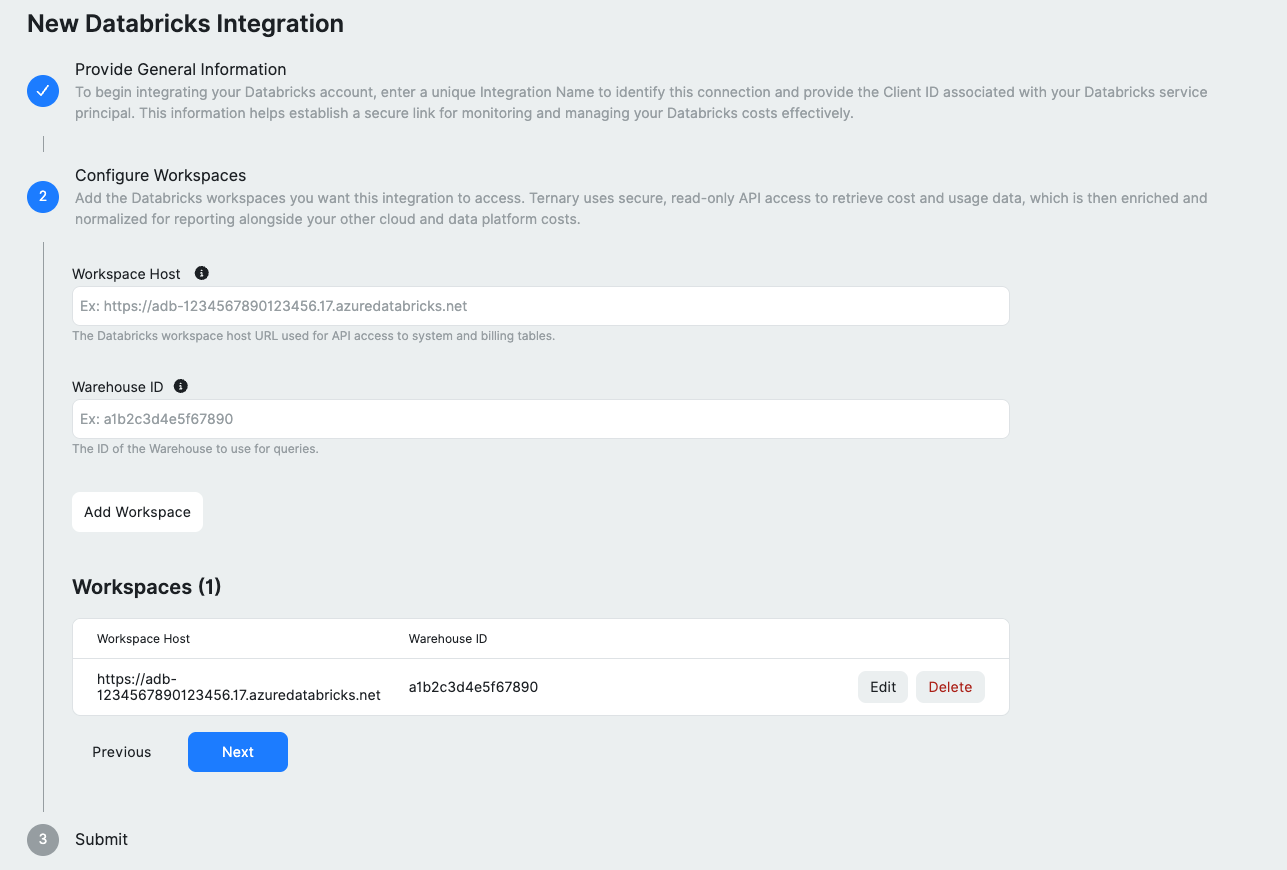
Add each Databricks workspace you want to ingest by providing the Workspace Host and Warehouse ID. Use the Add Workspace option to include multiple workspaces. Added entries can be edited or removed before proceeding.
Step 5: Review and submit
Review the configuration summary and click Submit to initiate ingestion. Ternary begins pulling data immediately and continues to update it every four hours.
Using Databricks data in Reports
Once ingestion completes, Databricks data appears as a new data source in the Reporting Engine.
- Group by clusters, resource types, tags, or other available fields
- Analyze Databricks spend alongside other cloud providers in reports and dashboards
Data is refreshed every four hours. To trigger an immediate update, use Request Billing Update from the integration settings.
Troubleshooting and common issues
| Issue | Potential Cause | Resolution |
|---|---|---|
| Authentication error | Service principal ID or token is incorrect/expired | Verify your Databricks service principal credentials and update them in the integration settings. |
| Missing date columns | Usage table lacks a start date/time field | Confirm that your Databricks usage table exposes a column like usageStartDate; at least one date column is required. |
| Federation policy error | OAuth federation policy not configured | See the OAuth Federation section below to configure the required federation policy. |
Important considerations
Service principal scope
The service principal must be created at the Databricks account level, not just within a single workspace. It must have access to all workspaces and SQL warehouses included in the integration.
Warehouse requirements
- The SQL warehouse must support queries on system.billing. tables
- Auto resume should be enabled to allow the warehouse to start when queries are issued
- Use an appropriate warehouse size based on workload, such as Serverless or Pro
Billing table availability
Databricks system billing tables, including system.billing.usage, are available only on supported plans and retain limited history. Ternary can only ingest data that exists within this retention window.
OAuth Federation
OAuth federation is required for authentication. Personal access tokens are not supported.
Configure a federation policy in Databricks to allow the Ternary service principal to authenticate. Refer to platform specific documentation:
The Databricks CLI can also be used to create the federation policy:
databricks account service-principal-federation-policy create SERVICE_PRINCIPAL_ID --json '
{
  "oidc_policy": {
    "issuer": "https://accounts.google.com",
    "audiences": ["databricks"],
    "subject": "<YOUR_TERNARY_SERVICE_ACCOUNT_EMAIL>",
    "subject_claim": "email"
  }
}'
Note Replace SERVICE_PRINCIPAL_ID with the numeric service principal ID from the Databricks admin console. The subject should be the Ternary service account email provided during integration setup.
If validation fails, review the error message. Ternary displays the required issuer, subject, and audience values for the federation policy.
FAQ
1. What permissions are required in Databricks?
Assign read-only access to usage tables for the service principal. Depending on the Databricks deployment, this may be a built in billing reader role or a custom policy with SELECT privileges.
2. How often is data refreshed?
After submitting the integration, initial ingestion may take several hours. Progress can be monitored from Admin → Integrations → Databricks. Data becomes available in the Reporting Engine once ingestion completes. A manual update can be triggered at any time using Request Billing Update.
3. Can the integration be deleted?
Yes. Removing the integration from Admin → Integrations stops ingestion and removes all Databricks data from Ternary. All associated data is removed from reports, dashboards, budgets, and forecasts.
Updated 7 months ago