
AI Observatory
Explore AI spend and token usage across your connected cloud and direct providers.
AI spend isn't a single line item — it's Claude models running through AWS Bedrock, Azure OpenAI alongside direct OpenAI API calls, and Gemini usage billed through Google Cloud. These workloads arrive through different channels, billed in different formats.
AI Observatory is Ternary's dashboard for AI spend and token usage — a shared view across the AI providers, publishers, model families, and versions in your connected sources. It brings cloud-billed AI and direct provider feeds into one reporting surface, with coverage based on the data each source supplies.
How It Works: The Unified AI Schema
Powering AI Observatory is a provider-agnostic framework that normalizes AI-specific data into a standardized schema. This enables consistent querying, reporting, and analysis regardless of where the spend originates.
Where available from the source, records are attributed by:
- Provider
- Publisher
- Modality
- Input/output tokens
- Model and model family
- Version
The provider is the platform serving the usage; the publisher is the model's creator. For Claude through Bedrock, the provider is AWS Bedrock and the publisher is Anthropic. Interface and data-fidelity fields add context where the source reports how usage was accessed and the level of detail available.
What You Can Do With It
- Cloud Provider AI Analysis — Break down AI spend in your connected cloud billing data. Compare provider, publisher, and model dimensions where the billing records supply them.
- AI Guardrails — Monitor AI spending with budgets and notifications based on your available source data. Cost and usage follow each source's export and ingestion schedule; these controls do not block or throttle requests in real time.
- Allocate, Showback, and Chargeback — Attribute AI spending to the teams, products, and cost centers that incurred it using your billing allocation workflow. Keep provider-reported charges and estimates identifiable when distributing costs.
- Custom Labels — Use custom labels to organize AI investment in ways that map to your business, alongside your existing reporting dimensions.
Beyond the Dashboard
AI Observatory is a starting point, not a ceiling. Its underlying reports are available in the Ternary Reporting Engine, ready to be filtered, grouped, and customized for the models and cost structures that matter to your business. The same AI-specific data points can be used in other reports you build in Ternary.
Open Report → AI Observatory, or Reporting Engine → AI Observatory if your sidebar uses the Reporting Engine label, and use the date controls to choose a period. The Global Date Selector, when enabled, takes precedence over the dashboard's saved range.

Default restores each widget's saved range, so check the period shown on each view.
You can change dates for the current view, but cannot save changes over AI Observatory. To retain its current widget and date settings, choose Save → Save as Copy, enter a name and create your own dashboard. Ternary opens the copy for customization. Leaving with unsaved settings lets you keep editing or discard them; it does not update AI Observatory.
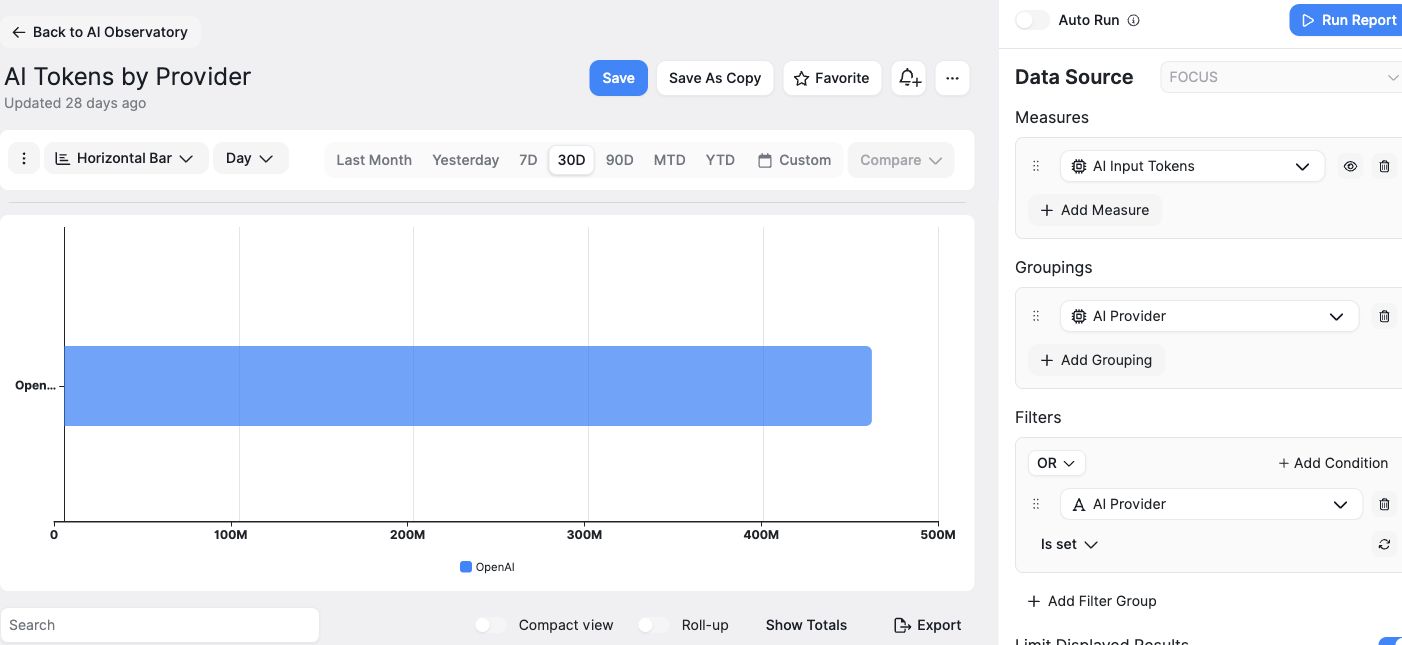
This example compares AI Input Tokens by AI Provider using internal test usage; M means million tokens. Use an explicit input or output token measure for token comparisons. Consumed Quantity can contain other usage units, regardless of a saved view's title.
Understand costs and token coverage
Token coverage depends on the connection. Direct provider feeds can supply AI Input Tokens and AI Output Tokens. Cloud-billed AI detail varies by source and available usage access. Snowflake Cortex charges generally arrive aggregated, while Cortex Agents usage can provide model detail and these token measures when Cortex usage access and sufficient usage data are available. Other cloud billing records may provide only aggregated charges or usage in Consumed Quantity; check its unit before comparing quantities. See the integration setup guide for the feed's coverage.
Reported costs, catalog estimates, and usage-only records provide different views of AI activity. Cost Source identifies estimates such as Anthropic catalog estimate and non-financial detail such as OpenAI usage only. Cost and token quantities may be recorded separately. Missing values do not mean zero usage, and cache-read/write subsets should not be added to input tokens a second time.
Subscription usage is not a complete invoice: OpenAI API data excludes ChatGPT seat fees, and Claude.ai Enterprise feeds do not currently add recurring seat or platform fees. See the provider setup guides for each feed's coverage.
Connected Sources
To connect a data source, choose an integration from Integrations Overview and follow its setup guide. Cloud-billed AI uses the cloud platform's billing integration; direct provider feeds use their own credentials. Each guide explains the data included and the access required.
AI Observatory also requires dashboard access and an available dashboard for your organization. Contact Ternary if an integration or dashboard is unavailable.
Updated 6 days ago