
Cost Summary
Learn how the Cost Summary in Ternary provides a consolidated view of cloud costs and credits to support accurate spend analysis and invoice reconciliation.
The Ternary Cost Summary provides a consolidated view of total cloud costs and credits over a selected time range. It is used to understand actual billable spend, reconcile invoice amounts, and analyze how costs are distributed across services, projects, and business dimensions.
By combining usage-based charges and applied credits, the Cost Summary reflects how cloud spend translates into real invoice totals at any point in time.
Choose the period to analyze
Cost Summary initially selects the previous calendar month in Invoice mode. Its own period selector controls this page; the Global Date Selector does not.
For invoice reconciliation, open Custom, choose Invoice, select the first and last invoice months, then select Apply. Both months are included; select the same month at both ends for one invoice month. Invoice-month records can differ from records in a matching usage-date range.
For usage-date analysis, choose a preset or open Custom > Fixed, set the start and end dates, and select Apply. Cancel leaves the selected period unchanged.
The selected period and applicable global filters scope both cost and credit results and their CSV exports.
What can be analyzed using the Ternary Cost Summary?
The Ternary Cost Summary provides a consolidated view of cloud spend and credits, designed for reconciliation, reporting, and high-level cost analysis across providers and accounts. It includes:
- Total cloud costs before and after credits
- Applied credits impacting the final invoice amount
- Exportable data for external analysis or reporting
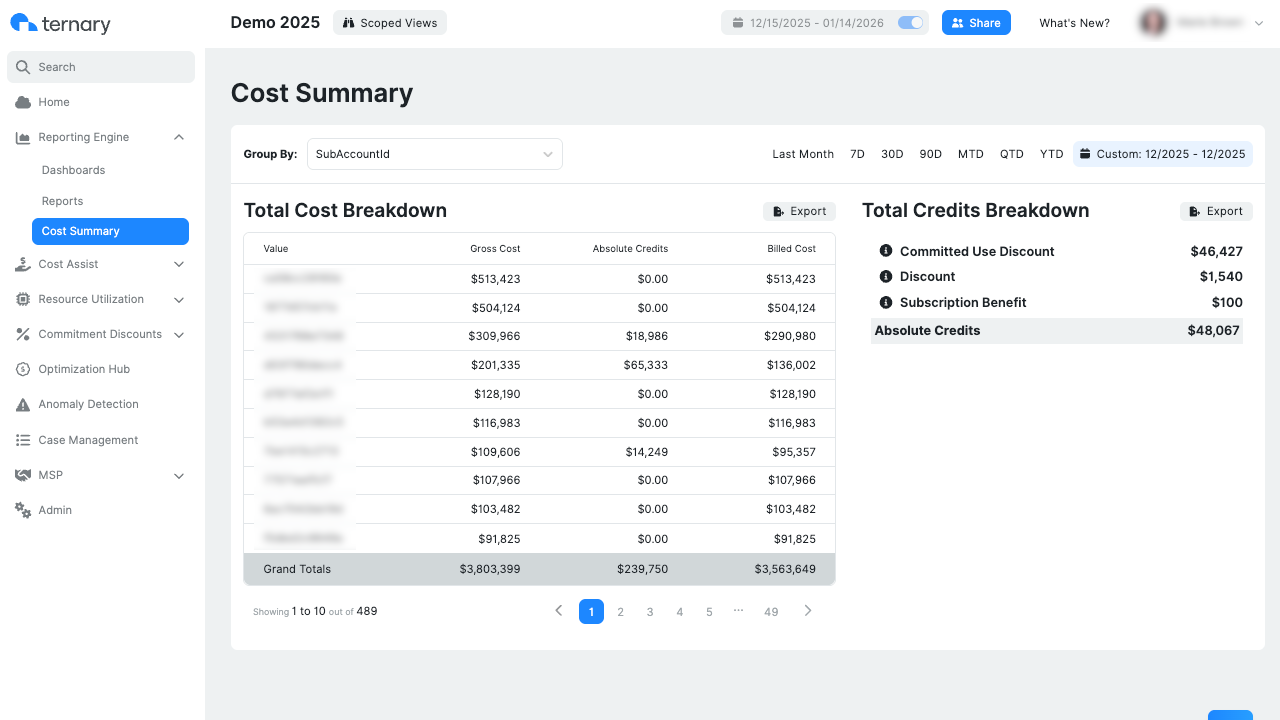
Beyond overall totals, the Cost Summary also supports deeper analysis workflows:
- Group Costs by Labels: Costs can be grouped by labels such as Project ID, Application, Business Unit, Environment, or any other supported dimension.
- Export Costs and Credits: In addition, cost and credit data can be exported in CSV format for offline analysis, reporting, or integration with financial systems.
How are credits reflected in Cost Summary?
Cost Summary includes multiple types of cloud provider credits to present a more accurate picture of effective spend. These credits are applied directly within the cost breakdown so users can see how each category contributes to the final invoice amount.
Depending on the provider, credits included in the total can cover:
- Commitment-based discounts, applied through long-term usage commitments such as Reservations or Savings Plans or Committed Use Discounts.
- Promotional discounts, offered temporarily by cloud providers for trials, incentives, or programs.
- Negotiated discounts, applied through custom pricing agreements with providers.
- Free tier discounts, reflecting usage covered under provider free-tier allowances.
Total Credits Breakdown shows supported credit categories for Google Cloud (GCP) when credit-type metadata is available. Its coverage differs from Absolute Credits in Total Cost Breakdown: an empty category panel does not mean there are no credits in the bill. Use Absolute Credits for totals across providers and the category panel for the available GCP breakdown.
Cost Summary shows Billed Cost alongside Absolute Credits. Gross Cost is calculated as Billed Cost plus Absolute Credits, reconstructing the amount before those credits. Gross Cost does not necessarily represent provider list pricing, so the difference should not be interpreted as total savings against list price.
Updated about 5 hours ago