
Database Insights
The Database Insights pages support the following services:
- Amazon ElastiCache
- Amazon MemoryDB
- Amazon OpenSearch Service
- Amazon Relational Database Service (RDS)
- Azure SQL Database
- Google Cloud Spanner
- Google Cloud SQL
- Snowflake Database
Visibility
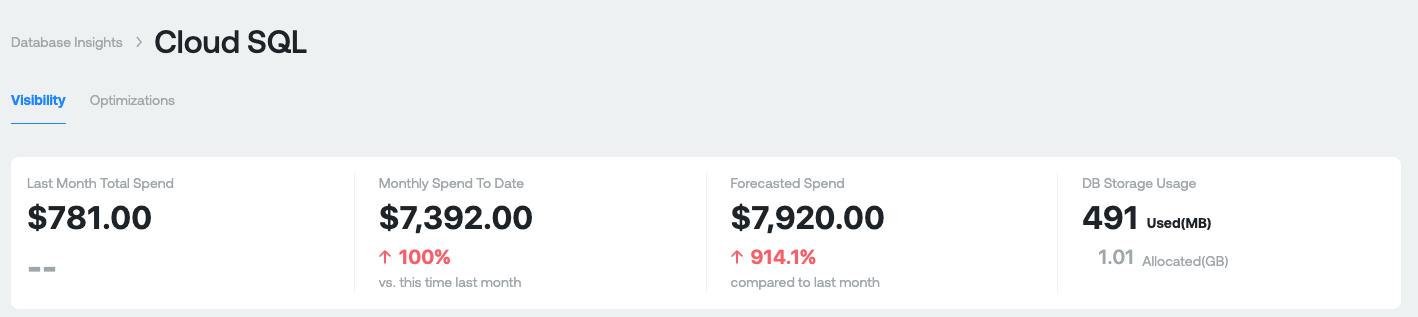
Purpose: This section is designed to give you a high level overview of what you're spending on Databases today.
Measures:
- Last Month Total Spend: This your total Database spend last month. This is gross cost and does not include any discounts you receive.
- Monthly Spend to Date: This is your total Database spend month-to-date for the current month. The percentage represents the difference between your current month-to-date spend compared last months-to-date spend. This is gross cost and does not include any discounts you receive.
- Forecasted Spend: This is a projection of your total Database spend by the end of the current month. The percentage represents what your projected spend will be this month compared to last month.
- DB Storage Used: The amount of Database storage used and the amount allocated.
Cost and Usage Graphs
Aggregate Costs Graph
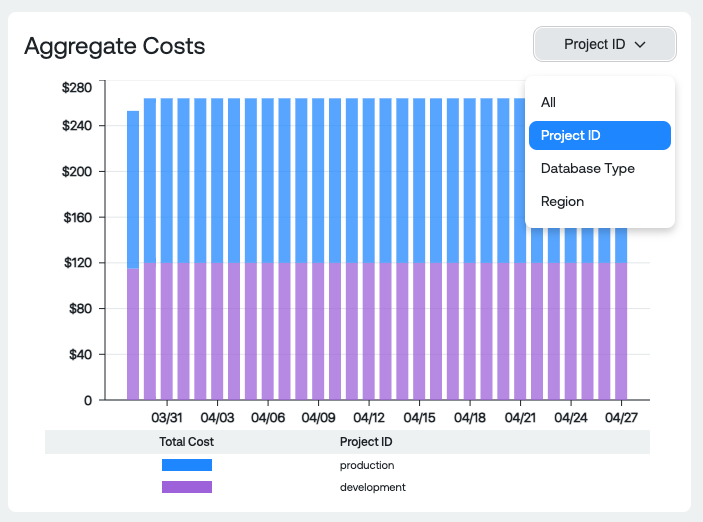
Dimension Groupings:
- All: Total Database spend, by day, for all databases in all projects
- Project ID: Total Database spend grouped by Project ID
- Database Type: Total Database spend grouped by database engine
- Region: Total Database spend per Region
Usage Graph
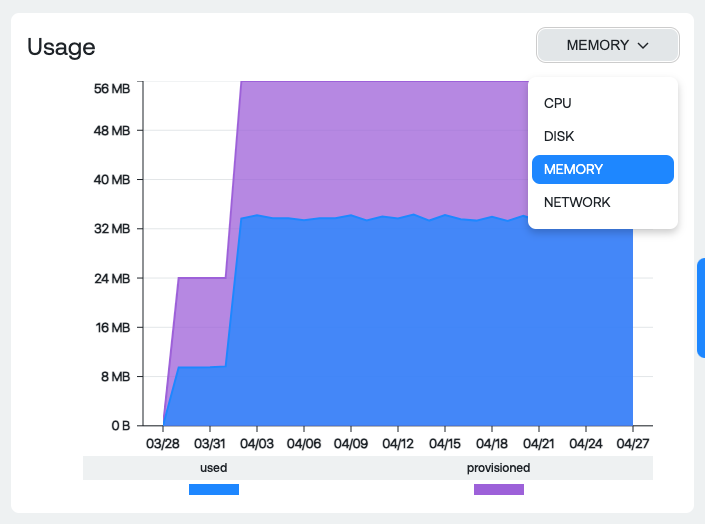
Dimension Groupings:
- CPU: Total amount of provisioned and used DB cores
- Disk: Total amount of provisioned and used DB storage
- Memory: Total amount of provisioned and used DB RAM
- Network: Total amount of network traffic in and out
Instance and Family Table

Measures:
- Classification: Database engine type and region grouped
- Project ID: Project that the database is running in
CPU&RAM Cost: Total cost for Cores and RAM grouped by classification and project - Memory utilization: Average of all the memory utilization / # of db instances
- Provisioned Byes: Total amount of provisioned storage
- Avg Used Bytes: Average amount of used storage
- Total Cost: All costs of running the associated DB instance (RAM, CPU, Network, Storage, etc)
View Instances Report
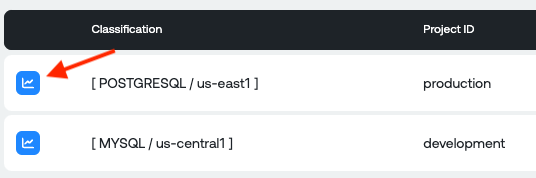
View Instances table
Once you select a particular row, it will filter the table to all the instances in that associated row and populate the table.

Measures:
- Instance ID: Name of DB instance
- Provisioned CPU: Amount of provisioned Cores for the DB
- Max CPU Util: Max CPU percentage utilized over the time period
- Provisioned RAM: Amount of provisioned RAM for the DB
- Max RAM util: Max RAM percentage utilized over the time period
- Provisioned Disk: Amount of provisioned Disk for the DB
- Max Disk Util: Maximum disk usage for the DB
Optimizations
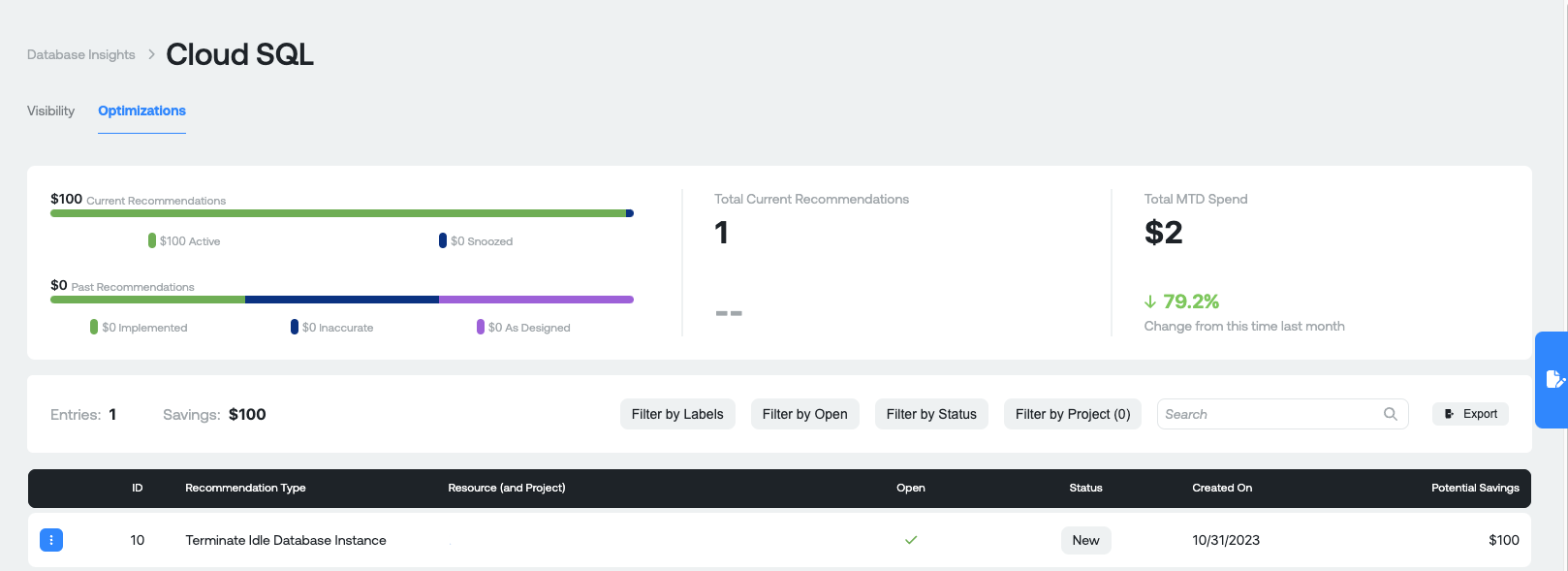
Before diving into what the recommendation insights numbers are, it is important to know the different types of recommendations that are potentially surfaced in Ternary for Database services in GCP, AWS and Azure, such as:
Google Cloud SQL recommendations:
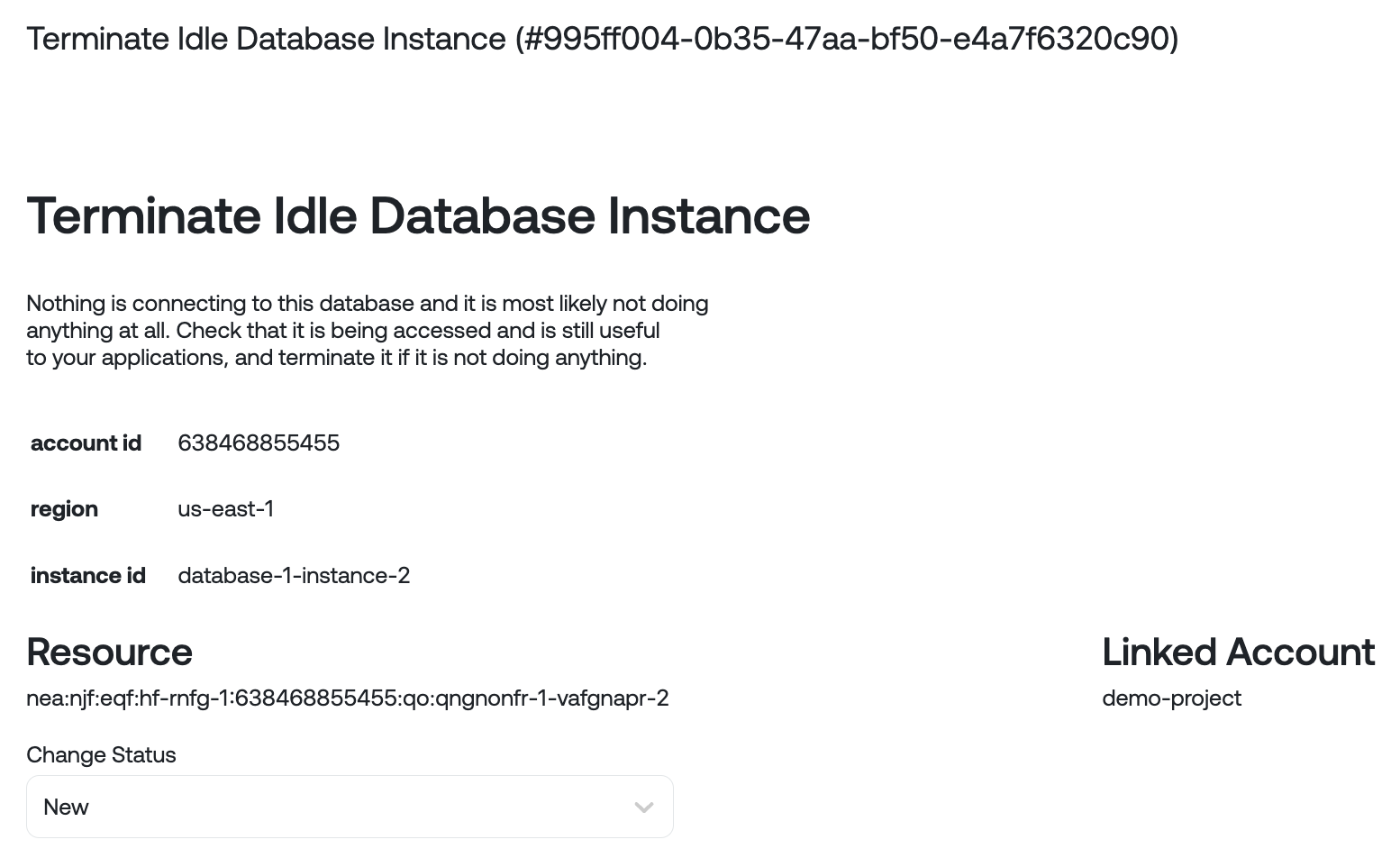
- Terminate Idle Database Instance: Nothing is connecting to this database and it is most likely not doing anything at all. Check that it is being accessed and is still useful to your applications, and terminate if it is not doing anything.
- Downgrade Database Instance Class: The database instance is over-provisioned. Consider downsizing to the next available instance type.
Amazon Relational Database Service (RDS) recommendations:
- Purchase RDS Reservation: Your RDS On-Demand usage during a specific time period matches categories that are eligible for a reservation. Recommendations might help you to reduce your costs. Reservations provide a discounted hourly rate compared to On-Demand pricing.
- Terminate Idle DB Instance: Nothing is connecting to this database and it is most likely not doing anything at all. Check that it is being accessed and is still useful to your applications, and terminate it if it is not doing anything.
- Downgrade Database Instance Class: The database instance class is over-provisioned. Consider downsizing to the next available instance type.
- Upgrade Database Instance Class: The database instance class is under-provisioned. Consider upsizing to the next available instance type.
- Increase Allocated Storage: Consider increasing the amount of allocated storage by 10% or enabling storage autoscaling to this database instance. Storage autoscaling automatically expands storage space to a specified maximum storage.
Microsoft Azure SQL recommendations:
- Rightsize Azure SQL Instance: The database instance is over-provisioned. Consider downsizing to a smaller database size, service tier or hardware type to save.
- Deprovision Idle Database Instance: Nothing is connecting to this database and it is most likely not doing anything at all. Check that it is being accessed and is still useful to your applications, and terminate it if it is not doing anything.
- Save with a Cosmos DB reserved instance: Based on the usage pattern of this Cosmos DB instance, you may save 20-30% purchasing a 1 or 3 year reserved instance. The information of which instance and the suggested size and term are included below.
- Save with a Microsoft SQL Server reserved instance: Based on the usage pattern of this Microsoft SQL Server instance, you may save 20-30% purchasing a 1 or 3 year reserved instance. The information of which instance and the suggested size and term are included below.
- Save with a Database for PostgreSQL reserved instance: Based on the usage pattern of this PostgreSQL instance, you may save 20-30% purchasing a 1 or 3 year reserved instance. The information of which instance and the suggested size and term are included below.
- Save with a Blob Storage Capacity Reservation: Based on the usage pattern of the storage account, you may save 20-30% purchasing a 1 or 3 year capacity reservation. The information of which instance and the suggested size and term are included below.
Measures:
- Current Recommendations: Total amount of savings available across all recommendations. Active represent recommendations that do not have a status of "Snooze". Snoozed represents recommendations that have a status of "Snooze" set by a user for any reason.
- Past Recommendations: Total amount of previous recommendations available across all statuses available in Ternary (these are historical recommendations). Includes recommendations with a status of Implemented, Inaccurate or As-designed after discussion with your engineering team and the appropriate status assigned to the recommendation in ternary.
- Total Current Recommendations: Total number of current recommendations available.
- Total MTD spend: Total gross Database spend month to date. The percentage represents your amount of MTD spend compared against this time last month.
Database Recommendation table

Measures:
- ID: Unique ID of the recommendation in the Ternary platform. Each recommendation will have a unique ID for reference later.
- Recommendation type: The type of recommendation (Please see above for a description of possible recommendations).
- Resource (and Account): Unique resource name and associated Account it exists in.
- Open: Whether the recommendation has a status of New
- Status: Status of the recommendation, as assigned in the Ternary platform. Possible values: New, Accepted, As-Designed, Implemented, and Inaccurate.
- Created On: The date that the recommendation was created in the Ternary database.
- Potential Savings: Potential savings if the recommendation is actioned.
When you click on any one of the Table Rows, you'll see a pop up appear:

Details of a single recommendation. You can also snooze a recommendation for a specific period of time or set a particular status.
Other Useful Functionality
Export Visibility and Optimizations: Export the current Visibility categories and Compute optimization recommendations as CSVs
For Visibility, you can export the categories table below the graph

For Optimizations, you can export the recommendations table below the graph
Updated 9 months ago